|
|
||||||||
 | ||||||||
| Navigation: Home | Site Map | Articles | Painless Software Schedules - Joel Spolsky, Ph.D. » Next » |
|
Painless Software Schedules By Joel Spolsky Wednesday, March 29, 2000 Last October, the Northeast US was plastered with ads for something called Acela, a new express train running from Boston to Washington. With TV ads, billboards, and posters everywhere, you'd think that it would have created some demand for Amtrak's new express service. Well, maybe. Amtrak didn't get a chance to find out. Acela was delayed, and delayed again, so the marketing campaign played out while Acela service wasn't even available. Which reminded me of something I heard a marketing manager say when his product got a rave review one month before it went on sale: "Great publicity! Too bad you can't buy the dang thing!" Testosterone-crazed game companies like to brag on their web sites that the next game will ship "when it's ready". Schedule? We don't need no stinkin' schedule! We're cool game coders! Most companies don't get that luxury. Ask Lotus. When they first shipped 123 version 3.0, it required an 80286 computer, which wasn't very common then. They delayed the product by 16 months while they worked to shoehorn it into the 640K memory limit of the 8086. By the time they were done, Microsoft had a 16 month lead in developing Excel, and, in a great karmic joke, the 8086 was obsolete anyway! As I write this, Netscape's 5.0 web browser is almost two years late. Partially, this is because they made the suicidal mistake of throwing out all their code and starting over: the same mistake that doomed Ashton-Tate, Lotus, and Apple's MacOS to the recycle-bins of software history. Netscape has seen its browser share go from about 80% to about 20% during this time, all the while it could do nothing to address competitive concerns, because their key software product was disassembled in 1000 pieces on the floor and was in no shape to drive anywhere. That single bad decision, more than anything else, was the nuclear bomb Netscape blew itself up with. So, you have to make a schedule. This is something almost no programmer wants to do. In my experience, the vast majority just try to get away with not making a schedule at all. Of the few that make a schedule, most are only doing it because their boss made them do it, halfheartedly, and nobody actually believes the schedule except for upper management, which simultaneously believes that "no software project is ever on time" and in the existence of UFOs. So why doesn't anybody make a schedule? Two key reasons. One, it's a real pain. Two, nobody believes that it's worth anything. Why go to all the trouble working on a schedule if it's not going to be right? There is a perception that schedules are consistently wrong, and only get worse as time goes on, so why suffer for naught? Here's a simple, painless way to make schedules that are actually correct. 1) Use Microsoft Excel. Don't use anything fancy like Microsoft Project. The trouble with Microsoft Project is that it assumes that you want to spend a lot of time worrying about dependencies. A dependency is when you have two tasks, one of which must be completed before the next one can begin. I've found that with software, the dependencies are so obvious that it's just not worth the effort to formally keep track of them. Another problem with Project is that it assumes that you're going to want to be able to press a little button and "rebalance" the schedule. Inevitably, this means that it's going to rearrange things and reassign things to different people. For software, this just doesn't make sense. Programmers are not interchangeable. It takes seven times longer for John to fix Rita's bug than for Rita to fix Rita's bug. And if you try to put your UI programmer on a WinSock problem, she'll stall and waste a week getting up to speed on WinSock programming. The bottom line is that Project is designed for building office buildings, not software. 2) Keep it Simple. The standard format I use for schedules is so simple you can memorize it. You start with just seven columns: 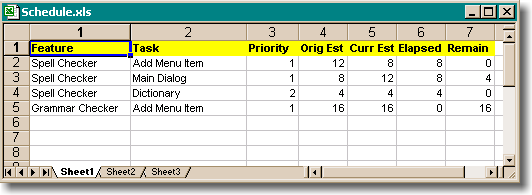 If you have several developers, you can either keep a separate sheet for each developer, or you can make a column with the name of the developer working on each task. 3) Each feature should consist of several tasks. A feature is something like adding a spell checker to your program. Adding a spell checker consists of quite a few discrete tasks that the programmer has to do. The most important part of making a schedule is making this list of tasks. Thus the cardinal rule: 4) Only the programmer who is going to write the code can schedule it. Any system where management writes a schedule and hands it off to programmers is doomed to fail. Only the programmer who is going to do the work can figure out what steps they will need to take to implement that feature. And only the programmer can estimate how long each one will take. 5) Pick very fine grained tasks. This is the most important part to making your schedule work. Your tasks should be measured in hours, not days. (When I see a schedule measured in days, or even weeks, I know it's not real). You might think that a schedule with fine grained tasks is merely more precise. Wrong! Very wrong! When you start with a schedule with rough tasks and then break it down into smaller tasks, you will find that you get a different result, not just a more precise one. It is a completely different number. Why does this happen? When you have to pick fine grained tasks, you are forcing yourself to actually figure out what steps you are going to have to take. Write subroutine foo. Create dialog such and such. Read the wawa file. These steps are easy to estimate, because you've written subroutines, created dialogs, and read wawa files before. If you are sloppy, and pick big "chunky" tasks ("implement grammar correction"), then you haven't really thought about what you are going to do. And when you haven't thought about what you're going to do, you just can't know how long it will take. As a rule of thumb, each task should be from 2 to 16 hours. If you have a 40 hour (one week) task on your schedule, you're not breaking it down enough. Here's another reason to pick fine grained tasks: it forces you to design the damn feature. If you have a hand-wavy feature called "Internet Integration" and you schedule 3 weeks for it, you are doomed, buddy. If you have to figure out what subroutines you're going to write, you are forced to pin down the feature. By being forced to plan ahead at this level, you eliminate a lot of the instability in a software project. 6) Keep track of the original and current estimate. When you first add a task to the schedule, estimate how long it's going to take in hours and put that in both the Original Estimate and Current Estimate columns. As time goes on, if a task is taking longer (or shorter) than you thought, you can update the Curr Est column as much as you need. This is the best way to learn from your mistakes and teach yourself how to estimate tasks well. Most programmers have no idea how to guess how long things will take. That's okay. As long as you are continuously learning and continuously updating the schedule as you learn, the schedule will work. (You may have to cut features or slip, but the schedule will still be working correctly, in the sense that it will constantly be telling you when you have to cut features or slip). I've found that most programmers become very good schedulers with about one year of experience. When the task is done, the Curr Est and Elapsed fields will be the same, and the Remain field will recalc to 0. 7) Update the elapsed column every day. You do not really have to watch your stopwatch while you code. Right before you go home, or go to sleep under the desk if you're one of those geeks, pretend you've worked for 8 hours (ha!), figure out which tasks you've worked on, and sprinkle about 8 hours in the elapsed column accordingly. The remaining time field is then calculated automatically by Excel. At the same time, update the Curr Est column for those tasks to reflect the new reality. Updating your schedule daily should only take about two minutes. That's why this is the Painless Schedule Method -- it's quick and easy. 8) Put in line items for Vacations, Holidays, etc. If your schedule is going to take about a year, each programmer will probably take 10 to 15 days of vacation. You should have a feature in your schedule called vacations, one for holidays, and anything else that consumes people's time. The idea is that the ship date can be calculated by adding up the remaining time column and dividing by 40 -- that's how many weeks of work are left, including everything. 9) Put debugging time into the schedule! Debugging is the hardest to estimate. Think back to the last project you worked on. Chances are, debugging took from 100% - 200% of the time it took to write the code in the first place. This has to be a line item in the schedule, and it will probably be the largest line item. Here's how it works. Let's say a developer is working on wawa. The Orig Est was 16 hours, but so far it has taken 20 hours and it looks like it needs another 10 hours of work. So the developer enters 30 under Curr Est and 20 under elapsed. At the end of the milestone, all these "slips" have probably added up to quite a bit. Theoretically, to accommodate these slips, we have to cut features in order to ship on time. Luckily, the first feature we can cut is this great big feature called Buffer which has lots o' hours already allocated for it. In principle, developers debug code as they write it. A programmer should never, ever work on new code if they could instead be fixing bugs. The bug count must stay as low as possible at all times, for two reasons: 1) It's easier to fix bugs the same day you wrote the code. It can be very hard and time-consuming to fix bugs a month later when you've forgotten exactly how the code works. 2) Fixing bugs is like doing science. It is impossible to estimate when you will make the discovery and solve the bug. If there are only one or two outstanding bugs at any given time, it's easy to estimate when the product will ship, because there's not much un-estimateable science in your future. On the other hand, if there are hundreds or thousands of outstanding bugs, it is impossible to predict when they will all be fixed. If developers always fix bugs as they go along, what's the point in having a debugging line item? Well, even if you try to fix every bug as you go along, at the end of every milestone, there is inevitably a lot of bug fixing when testers (internal and beta) find the really hard bugs. 10) Put integration time into the schedule. If you have more than one programmer, inevitably, there will be stuff that two programmers do that is inconsistent and needs to be reconciled. They might both implement dialog boxes for similar things that are unnecessarily inconsistent. Somebody will have to go through all the menus, keyboard accelerators, toolbar tools, etc., cleaning up and organizing all the new menu items that everybody has been adding willy-nilly. There will be compiler errors that show up as soon as two people check in code. This has to be fixed, and it should be a line item on the schedule. 11) Put buffer into the schedule. Things tend to run over. There are two important kinds of buffer you might want to consider. First: buffer to account for tasks that took longer than originally estimated. Second: buffer to account for tasks that you didn't know you would have to do, usually because management has decided that implementing wawa is SUPER IMPORTANT and cannot be left out of the next release. You may be surprised to find that vacations, holidays, debugging, integration, and buffer time add up to more than the actual tasks do. If you're surprised by this, you haven't been programming for long, have you? Ignore these at your peril. 12) Never, ever let managers tell programmers to reduce an estimate. Many rookie software managers think that they can "motivate" their programmers to work faster by giving them nice, "tight" (unrealistically short) schedules. I think this kind of motivation is brain-dead. When I'm behind schedule, I feel doomed and depressed and unmotivated. When I'm working ahead of schedule, I'm cheerful and productive. The schedule is not the place to play psychological games. If your manager makes you reduce an estimate, here's what to do. Create a new column in the schedule called Rick's Estimate (assuming your name is Rick, of course.) Put your estimate in there. Let your manager do whatever she wants with the Curr Est column. Ignore your manager's estimates. When the project is done, see who was closer to reality. I've found that just threatening to do this works wonders, especially when your manager realizes that they've just gotten into a contest to see how slowly you can work! Why do inept managers try to get programmers to reduce estimates? When the project begins, the technical managers go off, meet with the business people, and come up with a list of features which they think would take about 3 months, but would really take 9. When you think of writing code without thinking about all the steps you have to take, it always seems like it will take n time, when in reality it will probably take more like 3n time. When you do a real schedule, you add up all the tasks and realize that the project is going to take much longer than originally thought. Reality sinks in. Inept managers try to address this by figuring out how to get people to work faster. This is not very realistic. You might be able to hire more people, but they need to get up to speed and will probably be working at 50% efficiency for several months (and dragging down the efficiency of the people who have to mentor them). Anyway, in this market, adding good programmers is going to take 6 months. You might be able to get 10% more raw code out of people temporarily at the cost of having them burn out 100% in a year. Not a big gain, and it's a bit like eating your seed corn. You might be able to get 20% more raw code out of people by begging everybody to work super hard, no matter how tired they get. Boom, debugging time doubles. An idiotic move that backfires in a splendidly karmic way. But you can never get 3n from n, ever, and if you think you can, please email me the stock ticker of your company so I can short it. 13) A schedule is like wood blocks. If you have a bunch of wood blocks, and you can't fit them into a box, you have two choices: get a bigger box, or remove some blocks. If you thought you could ship in 6 months, but you have 12 months on the schedule, you are either going to have to delay shipping, or find some features to delete. You just can't shrink the blocks, and if you pretend you can, then you are merely depriving yourself of a useful opportunity to actually see into the future by lying to yourself about what you see there. And you know, the other great byproduct of keeping schedules like this is that you are forced to delete features. Why is this good? Suppose you have two features: one which is really useful and will make your product really great (example: tables in Netscape 2.0), and another one which is really easy and which the programmers would love to code (example: the BLINK tag), but which serves no useful or marketing purpose. If you don't make a schedule, the programmers will do the easy/fun feature first. Then they'll run out of time, and you will have no choice but to slip the schedule to do the useful/important feature. If you do make a schedule, even before you start working, you'll realize that you have to cut something, so you'll cut the easy/fun feature and just do the useful/important feature. By forcing yourself to chose some features to cut, you wind up making a more powerful, better product with a better mix of good features that ships sooner. I remember working on Excel 5. Our original feature list was huge and would have gone way over schedule. Oh my! we thought. Those are all super important features! How can we live without a macro editing wizard? As it turns out, we had no choice, and we cut what we thought was "to the bone" to make the schedule. Everybody felt unhappy about the cuts. To assuage our feelings, we simply told ourselves that we weren't cutting the features, we were simply deferring them to Excel 6, since they were less important. As Excel 5 was nearing completion, I started working on the Excel 6 spec with a colleague, Eric Michelman. We sat down to go through the list of "Excel 6" features that had been cut from the Excel 5 schedule. We were absolutely shocked to see that the list of cut features was the shoddiest list of features you could imagine. Not one of those features was worth doing. I don't think a single one of them was ever done, even in the next three releases. The process of culling features to fit a schedule was the best thing we could have done. If we hadn't done this, Excel 5 would have taken twice as long and included 50% useless crap features. (I have absolutely no doubt that this is exactly what's happening to Netscape 5/Mozilla: they have no schedule, they have no definitive feature list, nobody was willing to cut any features, and they just never shipped. When they do ship, they'll have lots of poxy features like IRC clients that they just shouldn't have been spending time on.) About the Author: I’m your host, Joel Spolsky, a software developer in New York City. Since 2000, I've been writing about software development, management, business, and the Internet on this site. For my day job, I run Fog Creek Software, makers of FogBugz—the smart bug tracking software with the stupid name, and Fog Creek Copilot—the easiest way to provide remote tech support over the Internet, with nothing to install or configure. Enter your email address to receive a (very occasional) email whenever I write a major new article. You can unsubscribe at any time, of course. |
